LinkedIn Tips for Seeing Full Names of 3rd Degree Connections

LinkedIn_No_Last_NameI recently wrote about the change LinkedIn made that no longer allows people with a free LinkedIn account to view the full names of 3rd degree and group connections.

While you can go through the trouble of using a search engine such as Bing to view any public LinkedIn profile, there are a few ways that you can find and view the full names of 3rd degree and group connections from within LinkedIn even if you only have a free account.

LinkedIn Activity

When you come across a 3rd degree or group connection that you would like to know the full name of…
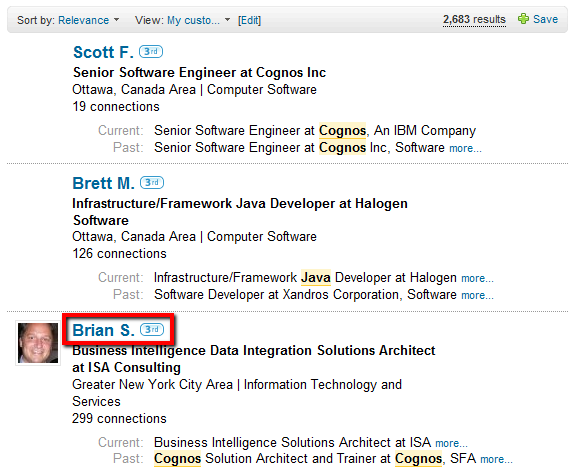
LinkedIn_Search_Full_Name_Reveal_1

…open the profile, and if the person you are interested in has any LinkedIn activity in terms of network updates, you can actually see their full name in both activity sections.
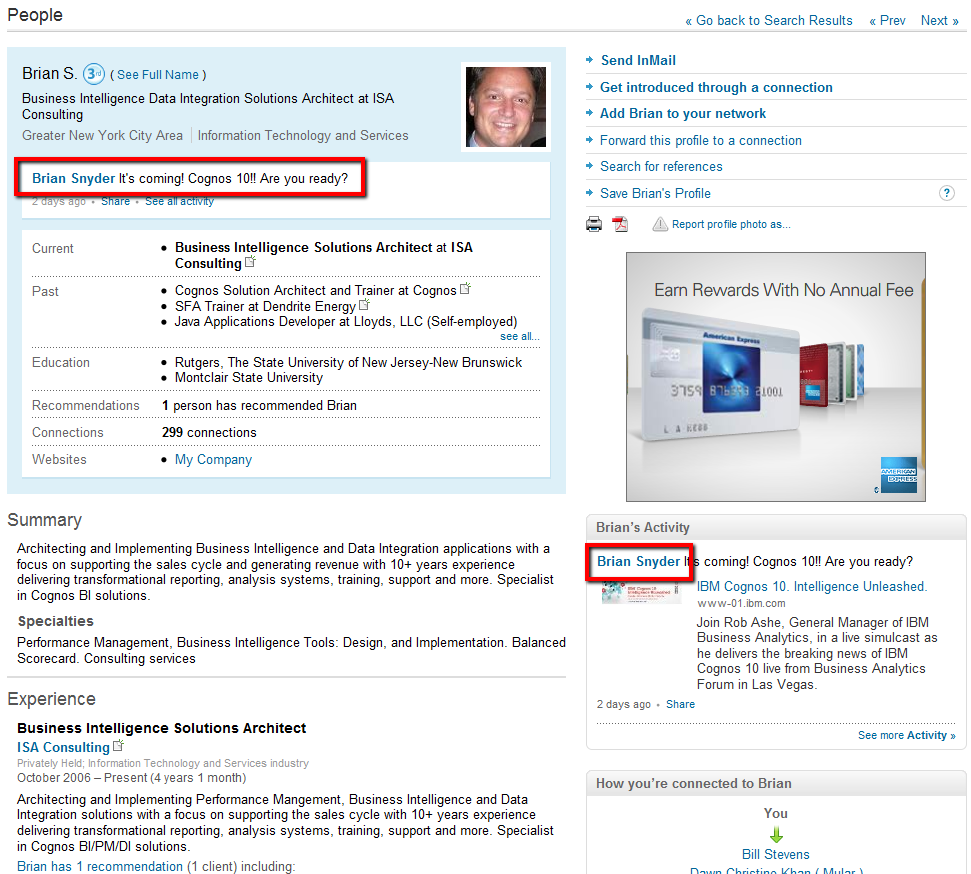
LinkedIn_Search_Full_Name_Reveal_2

Of course, not everyone on LinkedIn updates their status, so this will only work for people who actively use this feature.

LinkedIn Recommendations

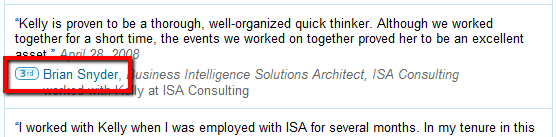
Additionally, if the person you are interested in has recommended anyone, or others have recommended them, you can explore those sections and profiles and find the full name of the person there. For example:
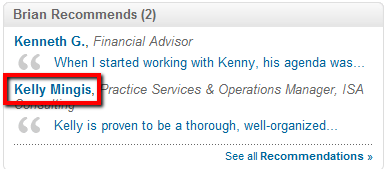
LinkedIn_Search_Full_Name_Reveal_3

When you open the profile of the recommended person, find the recommendation and you will see the full name of your original target person.
LinkedIn_Search_Full_Name_Reveal_4

Viewers of this Profile also Viewed

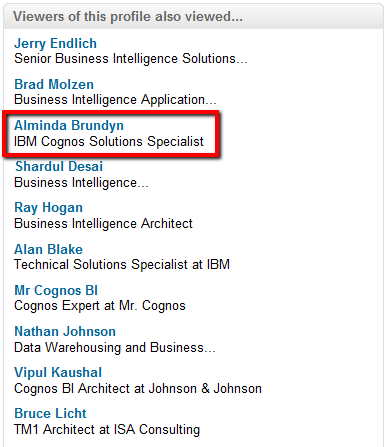
As some people have commented to, you can also leverage the “Viewers of this profile also viewed” section to try and reveal the full name of the person you’re interested in. Using the same profile as in the above examples, it took me 3 tries to get the result I was looking for. When I clicked on Jerry’s and Brad’s links, Brian (my original profile of interest) was not listed.
LinkedIn_Search_Full_Name_Reveal_5

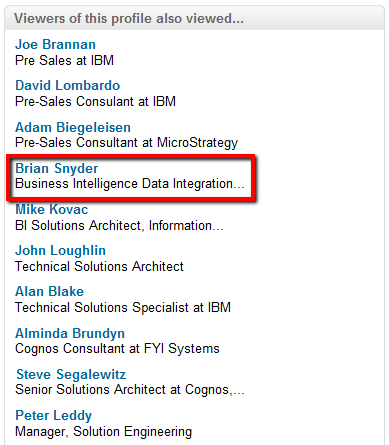
However, the 3rd time was indeed the charm in this case. When I clicked on Alminda’s link, Brian was listed in her “Viewers of this profile also viewed” section, with his full name viewable.
LinkedIn_Search_Full_Name_Reveal_6

…and Beyond

In addition to the 3 methods I’ve outlined above, Irina Shamaeva has discovered a novel way of revealing the full names of 3rd degree profiles and even those of people beyond your network. I won’t publish them here – I’d advise you to attend one of her webinars if your’re interested in learning this method.

Happy hunting!

Related Posts Plugin for WordPress, Blogger...


  • http://magicsourcer.wordpress.com Sarang

    Nice one Glen!!!

  • Megan Calimbas

    Great tips! One other trick that has been working for me is to do a simple google search on the companies they worked for. It usually produced the LI profile with the full name in the results.

  • http://magicsourcer.wordpress.com Sarang

    Simply do

    site:linkedin.com Fname AND (company name) AND job title

  • http://www.capitalgreen.eu Regan

    I’m all for work-rounds – but as an avid LI user I must say the features you get from the paid accounts are worth every penny. Inmails when you are not in the same groups, profile organisers/folders, saved searches….the list goes on!

    Stop posting a couple of jobs on the Job boards and get your boss to spend that budget on the best recruiting tool since……well since I can remember

  • http://magicsourcer.wordpress.com Sarang

    Glen,

    Strange but I checked today with LI and “Viewers of this Profile also Viewed” is also showing people with last name abbreviations. Seems LI is listening to you :)

    Sarang

  • Jeff

    I’ve noticed the same thing – “Viewers of this profile also viewed” … I would say LI is DEFINITELY reading this blog and making adjustments as necessary. ;)

  • http://www.booleanblackbelt.com Glen Cathey

    @ Sarang and Jeff – yes, they are all over it. “To share, or not to share….” :-)

    @ Megan and Sarang, I’ve found that simply Binging the headline phrase of a profile (in quotes) works beautifully.

  • http://www.recruitinganimal.com Recruiting Animal

    Hi Glen,

    I put the title of the person as listed in google and it usually brings the person’s full profile up.

    However, sometimes the names in the Also Viewed section come up as 1st initial only in the surname.

    At first, I found that I could solve this problem by clicking on the person’s Linkedin URL. But that doesn’t seem to work anymore.

    As someone mentioned, I assume that LI is watching the blogs for us to tell them where the loopholes are. They they plug them up.

  • Chinmay

    Hi All,

    I found a very simple trick- Open up the profile of your 3rd degree contact. Click on “Find references” on the right hand side and you see the full name!!
    But few of my colleagues tried it, it didn’t work on their account.

  • http://magicsourcer.wordpress.com Sarang

    Good one Chinmay….. it works

  • Jim Bisbee

    Another way to see the full last name of a 3rd degree contact is to download the page as a PDF. Click on the Adobe icon right next to the printer icon in the top right-hand corner of the page. Once opened, the person’s full name appears. The same is true for names that appear in references with only the first initial of the last name.

  • http://www.recruitinganimal.com Recruiting Animal

    Thanks Jim. Gotta try that. As mentioned b4 LI people probably read Glen’s site daily.

  • hawkeyed

    Great loopholes guys. Another one is if you forward the profile, it goes with the full first and last name :)

  • JM

    Solid post; thank you.

  • Victor Soroka

    Thanks for the article Glen. I’ve found one more way to see last name but if I post it here it definitely stops work:)

  • Sachin Arora
  • Mmartin1382

    I love this feature of LinkedIn.

  • Chinmay

    This seems to be not working from Today. LI is all over :(

  • Sheineken

    Great tip.  I think I may have come to find a bit of an easier way to find the last name of an individual when they only show their last initial. 

    What I do is while viewing that person’s profile I click on the link to get introduced to this individual.  At the next screen, if you simply hovering your cursor over their name it will actually show you their full name instead of just the initial.

  • Gtalkteam2009

    Just click share and send the profile to anyone of your 1st degree contacts(you can create a dummy profile also) and go to sent items and click view profile for the last message you have sent….

  • Wye

    They show everything if you logout.
    The idiots …
    I swear IPOs are making companies stupid money grabbing whores.