Monthly Archives: February 2009

LinkedIn Poll: Job Boards More Effective for Getting Jobs

Job Boards vs. Social Media – which is more effective at helping people get jobs?

At least for now, statistics appear to support that job boards are either more widely used to find jobs, or simply more effective at landing people jobs than social networking sites.

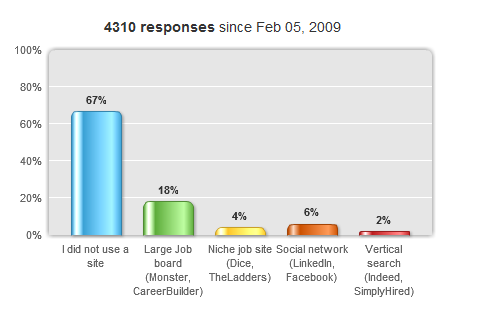
According to a recent LinkedIn poll, 4310 people responded and 22% of the respondents used a major (Monster, Careerbuilder, ec.) or niche job board (Dice, The Ladders, etc.) to find their last job vs. 6% who indicated that they landed their last job through the use of a social networking site (LinkedIn, Facebook, etc.).

Here is the link to the poll results. Continue reading

Challenging Google Resume Search Assumptions

This post is second in a series focused on using Google to search for resumes on the Internet.

In the first post I left some unanswered questions, such as why:

  • I didn’t talk about searching for CV’s
  • I didn’t suggest using the tilde ~ operator in conjuntion with the word “resume”
  • I didn’t use -~job when trying to eliminate false positive results
  • I didn’t talk about targeting filetypes
  • I didn’t talk about just searching for the word “resume” without using it in conjunction with inurl: or intitle:
  • I didn’t mention the use of Google Custom Search Engines (CSE’s) to find resumes

Whether or not you had those questions burning in your mind, I will address them all in this post.

Challenging Google Resume Search Assumptions

I’ve read my fair share of recruiting blogs and online discussions between recruiters and sourcers. As such, I encounter quite a bit of advice regarding tips and tricks to use when searching for resumes on the Internet using Google.

Some of the suggestions I see make sense at first, but being the inquisitive guy that I am, I don’t just take the suggestions and run with them, assuming they accomplish what they seem to accomplish. I take the time to test search tips, tricks, and suggestions to make sure they add value to my search efforts and that they do EXACTLY what they claim to do.

Today, you get to benefit from some of these tests, as I am going to challenge some of the suggestions I’ve come across over the years when it comes to searching for resumes on the Internet using Google. Let’s get going, shall we? Continue reading

How to Find Resumes on the Internet with Google


Want to learn how to find resumes on the Internet using Google?  You’ve come to the right place!

Whether you are new to searching the Internet for resumes or you are a veteran Interent sourcer, I’ve included some tips, tricks, and observations for the novice and expert alike.

Targeting Resumes

When using Google to search specifically for resumes, it’s a good idea to begin by searching for the word “resume” in the title and/or the url of web pages.

For example: (intitle:resume OR inurl:resume)

Here is a sample result to illustrate how this works – we can see the word “Resume” in the blue TITLE line, as well as in the green URL line. The first line of any search result is the title of the webpage, and the url is the specific web page’s address.

Targeting the word “resume” in the title and/or url is very handy, because for many people, it’s simply common sense/instinct to either title the web page containing their resume with the word “resume,” and/or save their resume using the word “resume” in the name of the file.

Eliminating False Positive Results

Continue reading

Free and Original Content – Let’s Keep it That Way

I had a fantastic converstation with the incredibly knowledgeable and insanely helpful Eric Jaquith  the other day, and he gave me a “wake up call” with regard to the content that I publish here on Boolean Blackbelt.

Although I have only been blogging for a few months now, I have worked very hard to publish high-value content for everyone to enjoy, use, and benefit from. Call me naive or a blogging n00b, but it never really occured to me that people might use my content and not give me proper credit for it and perhaps even try to profit from it by selling it to others.

I put quite a bit of time, thought and effort into writing my articles, and many of the concepts I am presenting are 100% original – and they are 100% FREE for everyone who stops by or subscribes to my blog to read what I have to say (which I GREATLY appreciate, by the way).

The thought that people might take my ideas and the content that I am providing to you for FREE and attempt to profit from it really bothers me, plus it’s simply WRONG, so I’ve decided to license all of the content I publically publish here on www.booleanblackbelt.com under a Creative Commons Attribution-Noncommercial-No Derivative Works 3.0 United States License.

Creative Commons License

You’ll see it at the bottom of every post as well as at the bottom of my website. That specific license allows you to download/copy my work and share it with others as long as you mention me and link back to me, and you can’t change my work in any way or use my work commercially to profit from it. If you like what I write – please feel free to share it with others, just don’t take credit for it or try to make money from it.

I write to share my ideas so that everyone can benefit, and no one should have to pay someone else to benefit from my original and free content.  So I ask you assist me in being able to continue to provide you with valuable free information – if you see or hear someone else writing or talking about original content you have seen here on www.booleanblackbelt.com and claiming credit for and/or attempting to charge you for it, please let me know.

I’ve put a significant amount of thought and effort into my work on the concepts of user-defined semantic search for sourcing and recuritingLean/JIT recruitingTalent Intelligence, and my concepts of the Hidden Talent Pools of candidates you can’t find, and the Hidden Talent Pools of candidates you don’t find with your Boolean searches. If you search for those concepts on the Internet – you will find my content – not someone else’s. I want as many people to be exposed to these ideas as possible – all I ask is that if you are going to redistribute my work – give me proper credit, and don’t try to make money from it.

THANK YOU

Thank you for stopping by to read my blog – if you haven’t already, I hope you’ll subscribe and automatically recieve the 2-3 articles I publish every week. And please don’t keep me a secret – pay it forward and tell others in the recruiting and staffing industry about my site so that they can benefit from it as a free resource.

Boolean Search Does Not = Internet Search

If you read certain sourcing and recruiting blogs and discussion groups, you might get the impression that Boolean search pretty much equals Internet search – such as searching for people and profiles using Google, Yahoo, or other search engines. Some sourcing and recruiting professionals may be surprised to learn that Boolean logic significantly predates the Internet and even computers – by a couple hundred years!

The word “Boolean” comes from the man who invented Boolean Logic in the 19th century – George Boole. Boolean Logic is the basis of modern computer logic, and George Boole is regarded in hindsight as one of the founders of the field of computer science.

Now that you know Boolean logic was created in the 1800’s – it’s pretty obvious that Boolean logic is not just for searching for people and information on the Internet. Practically any information system from which you need to search and retrieve information from “speaks” Boolean to some extent, whether you realize it or not.

Applicant Tracking Systems

I was first exposed to Boolean search back in 1997 B.G. (Before Google) when my sole source of candidates was a Lotus Notes resume database by the name of CPAS, made by VCG. Although the CPAS product (which no longer exists) was far from a fully featured Applicant Tracking System, thankfully it did support full Boolean logic, with very few limitations. If it didn’t support full Boolean logic, this blog would probably would not exist – and if it did, I wouldn’t be writing it. Thank you CPAS!

The CPAS search interface allowed me to hand-code highly precise and effective Boolean search strings using all three standard Boolean operators: AND, OR, and NOT. While there are some applicant tracking systems on the market that do support full Boolean logic, it is an unfortunate fact that too many ATS’s available today do not support creating searches using full Boolean logic, which significantly handicaps sourcers and recruiters from leveraging their internal corporate candidate databases.

Job Boards

In contrast – all of the major job board resume databases (Monster, Careerbuilder, Hotjobs, Dice, etc.) support full Boolean logic. As I have written about many times before, Monster even supports “extended” Boolean search functionality with the incredibly powerful NEAR operator.

Social Networks

While most social networks are painfully difficult to search with their extremely limited search interfaces, LinkedIn does support creating search strings employing full Boolean logic. In fact, it appears that you can create Boolean search strings of unprecedented length and complexity on LinkedIn. If you haven’t already, please read this post I wrote that compares searching LinkedIn using LinkedIn’s search interface with searching Linkedin using Google and the x-ray technique. I got tired of entering words into LinkedIn’s search bar after cramming 316,638 characters into it. That’s the equivalent of a Boolean search string that contains over 60,000 words and is approximately 120 pages long!

Internet Search

What’s especially ironic about the wide spread perception that Boolean = Internet search is that most Internet search engines don’t even support full Boolean logic. For example, although Google supports Boolean search strings containing AND, OR, and NOT (with the minus sign) functionality, you cannot use the NOT/- operator on an OR statement.

Let’s look at the results when we try and run this search string on Google: Continue reading

FREE LinkedIn Search: Internal vs. X-Ray

While there is a growing number of recruiting professionals and organizations who pay for premium access to LinkedIn, there is still a large number of people who leverage LinkedIn with a free or “Personal” account.

If you’re on the fence about paying for increased access to LinkedIn, you’re reading the right post. I’m going to compare searching LinkedIn from the “inside” with a free “Personal” account using LinkedIn’s new people search interface with searching LinkedIn from the “outside” using Google and the x-ray technique.

If you are not familiar with the x-ray search technique, it will be covered in depth with examples later in this post.

I’ll also offer at least 3 different ways to create and automate LinkedIn searches outside of the LinkedIn search interface.

Free LinkedIn Search – From the “Inside”

There are actually a number of different ways and places to search for people on Linkedin. The more powerful methods involve #1 LinkedIn’s advanced search interface and  #2 “Hand-coding” search strings using LinkedIn’s advanced search operators.

Controlling Candidate Variables

Both of those methods allow you to control critical candidate variables such as current and/or past employer, current and/or past title, industry, and location via zip code radius search. During or after you configure your search, you also have the option to sort results by relevance, relationship, relationship + recommendations, and keyword match/count. Continue reading

Job Boards vs. Social Networking Sites

I follow a number of recruiting blogs as well as many sourcers and recruiters on Twitter and I see a growing trend of job board bashing – typically comparing them (very) unfavorably to social networking sites and applications.

I love and leverage social networking as much as the the next recruiting professional, but I refuse to just blindly follow the crowd or jump on the bandwagon when it comes to anything. With all of the buzz about social media and so many people running away from and disparaging the job boards, I am going to step out of the crowd and try to figure out where this perspective that job boards = old/bad, social networking = new/good comes from, because to me, some of the reasoning doesn’t add up.

JOB BOARDS: JOB POSTING vs RESUME DATABASES

First, let me say that when I think of the job boards, I think of their resume databases – not job posting. Job posting is job posting – whether it’s on a paid job board, a free board, LinkedIn, Twitter, or Indeed.  While it can definitely work, it’s a passive and reactive technique that has a low ROI in most cases with many respondents who do not meet the basic qualificiations of the position posted.

I ACTUALLY USE BOTH JOB BOARDS AND SOCIAL NETWORKING

One thing I want to make clear is that I actually have access to and use major paid job board resume databases, and I also use LinkedIn, Twitter, and Facebook. It is very important to realize that some people who speak negatively about the major job boards actually don’t use them. I am not really sure how someone can review or form an opinion of a product they don’t use. I’ll leave that for you to figure out.

EXCELLENT BLOG POST

This well-presented post was brought to my attention via Twitter recently: Top 5 Reasons Why You Should Recruit Thru Social Networks, and I agree with most of the points made and reasons presented. However, because there is an undertone of job boards = old/bad and social networks = new/good, it offers a good platform to me to offer some counterpoints.  Continue reading

LinkedIn: Private vs. Out of Network Results

LinkedIn: Private vs. Out of Network Results

I recently wrote about how to leverage LinkedIn’s Advanced Search Operators and I commented on LinkedIn’s relatively new search interface. Aside from search options, one other somewhat new aspect of searching inside LinkedIn using their search interface is that you can now return some results that are outside of your network. These typically appear as results without a name, and instead say “private”

NON-PUBLIC PROFILES

When you find a private profile, in some cases, the user has actually decided to not publish their LinkedIn profile publicly to the web. If this is the case, you simply cannot find them via Google via the site:command.

Here is an example – using LinkedIn’s search interface, I ran a simple single word search – Java.  Here is an example of a result that is outside of my network:

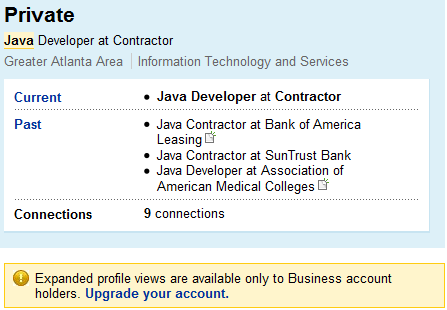
As you can see – this person is not in my network, and the result shows no name, just a headline title. When I click on the title, this is what I see:

Taking unique information from this profile, let’s try and use the site: command on Google to x-ray LinkedIn and see if we can find this person.

site:linkedIn.com “greater atlanta area” java “bank of america” suntrust Continue reading